

What is an Arduino?
In the simplest of terms, an Arduino is a tiny computer that is designed to interact with its physical environment. This means that it can sense things around it (for example, sound, light, temperature, touch) and react to these based on your instructions. This sounds a little abstract, so let's look at a few examples. Arduino can:
- switch the lights on when it gets dark, and off when it's light again
- close the blinds in a room when it's too warm and sunny
- switch on a pump to water your plants when the soil gets too dry
- switch on your heater at a certain time, if it's a cold day
- drive a robot around a room, avoiding obstacles
- detect intruders and then send you an SMS, flash lights, sound alarms, and spray the intruders down with the garden sprinklers!
Different Models
There isn't just one "Arduino" - there are many different models, each with different advantages. The most popular one to get started with - and the one we'll be focussing on during this tutorial - is the Arduino UNO R3.
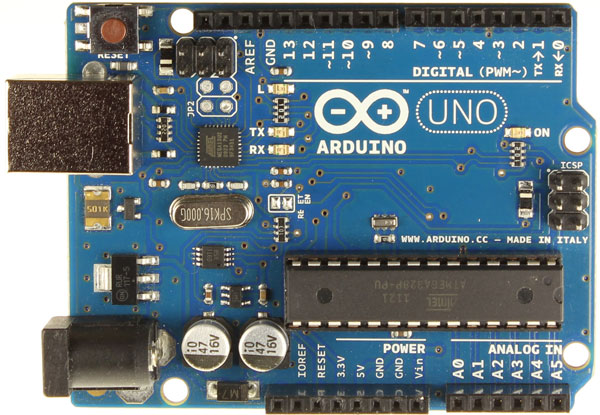
Arduino Uno R3
Some Background on the Arduino
Arduino was developed by a team made up of Massimo Banzi, David Cuartielles, Tom Igoe, Gianluca Martino, and David Mellis over 7 years ago, and has continued to grow in popularity since then. The fact that there are so many hardware options today, books available, blogs and projects published, shows just how clever the concept is.
Arduino is really a series of development boards containing microcontrollers ideally suited to sensing and reacting to world around them. Alongside the physical hardware of the boards, is a programming language that allows you to control how the board reacts to its environment. There are many other platforms and boards similar to Arduino (PICAXE, BASIC Stamp, etc.), but they don't quite have the same set of advantages:
- Arduino is open-source, both on the hardware and software fronts, which makes the expansion and customisation options almost limitless
- The microcontrollers used are from the well-known Atmel ATMEGA series, which offers opportunities to up- and down-scale your projects
- Arduino is a relatively inexpensive platform - and as it's open-source there are plenty of well-made clones as well as guides to help you build your own
- Arduino is a cross-platform development environment. Although this book will focus on the Windows platform, the development software runs on Linux and Macintosh OSX
Types of Arduino
There are a wide variety of boards that Arduino sell - simple ones to get you started, tiny ones to build into your projects, larger ones to control complex systems with many inputs and outputs, small wearable boards designed to be stitched into clothing, boards with Ethernet or Bluetooth connectivity, and more recently ones with tiny onboard Linux computers... and these are just the official Arduino boards.
There are many third-party boards that take the basic Arduino architecture and extend and expand it to create all sorts of tailor-made platforms. Take a browse on the Arduino website to see the variety that they sell, or do a search to see some of the other clones out there.


